What Matters Most Up Front
Assign one owner to each field before the first sync goes live. Product data breaks fastest when title, price, inventory, variant attributes, and metafields all answer to different systems.
The cleanest setup starts with ownership, not software. The most expensive errors come from fields that look minor, such as metafields and tags, because they drive filters, bundles, and theme logic. A bad value in one of those fields hides quietly, then shows up as the wrong assortment, broken navigation, or missing product rules.
| Field group | Source of truth | Why it matters | Governance rule |
|---|---|---|---|
| Title, description, SEO copy | Content owner or PIM | Prevents copy overwrite loops | Only one system writes these fields |
| Price, compare-at price, promotions | Pricing system or ERP | Stops promotion drift | Approve every exception and log it |
| Inventory and availability | ERP or OMS | Prevents oversell and phantom stock | Reconcile failures the same day |
| Variant attributes | Product master | Keeps SKU matching stable | Reject blank or duplicate option values |
| Metafields, tags, collection signals | Schema owner | Drives filters and bundle logic | Validate keys before publish |
| Images and asset links | DAM or media library | Prevents broken PDP assets | Check asset presence before sync |
The hidden cost sits in the cleanup queue. A field with two owners creates overwrite loops, and a field with no owner becomes a manual fix every launch day.
The Comparison Points That Actually Matter
Compare integrations by error handling and ownership, not by the number of connected apps. A simple connector with clear logs beats a larger stack that hides failures behind a generic success message.
| Integration path | Data-quality strength | Maintenance burden | Best fit | Main trade-off |
|---|---|---|---|---|
| Native connector | Low to moderate | Low | Small catalog with one owner | Weak conflict handling and shallow logs |
| iPaaS or middleware | Moderate to high | Moderate | Separate systems for content, price, and stock | Mapping audits and exception review |
| Custom API pipeline | High | High | Large catalog with strict governance | Support load and version drift |
The wrong comparison is feature count. Most guides recommend the broadest sync layer first; that is wrong because feature breadth does not stop overwrite loops. If nobody owns the exception queue, the data layer is too complex for the business.
The Decision Tension
Choose simplicity when the catalog changes slowly. Choose control when one bad value reaches search, ads, feeds, or fulfillment.
Lower-maintenance setups reduce daily work but leave less room for field-level rules. A narrow connector keeps admin overhead low, yet it also leaves more cleanup for merchandisers when a source file arrives with blanks, duplicate SKUs, or renamed attributes. A governed pipeline reduces rework because it catches bad updates earlier, but every schema change adds mapping review, retry logic, and permission checks.
A practical rule helps here. If more than 10% of synced edits need manual repair in a week, the integration is too loose. Tighten field ownership before adding another tool.
The Situation That Matters Most
Match the workflow to the cadence of change, not to the number of integrations. The same setup that works for a small catalog fails fast when content, inventory, and pricing all move on different clocks.
- Single-editor catalog: Keep Shopify as the final edit point and automate only narrow operational fields. Broad sync adds review work without improving consistency.
- ERP-LED stock and price: Let ERP own those fields. Shopify should receive those values, not negotiate them.
- PIM-LED content: Push titles, descriptions, and attributes from PIM on a publishing cadence. That keeps copy review separate from stock updates and avoids same-day overwrites.
- Bundle-heavy or filter-heavy store: Lock metafields and variant option names early. One renamed key breaks collection rules, search facets, or bundle logic before the product page shows an obvious error.
A live sync on every field creates re-edit loops when merchandisers fix copy in Shopify and the upstream source replaces it later the same day. That loop turns a technical convenience into recurring catalog debt.
Proof Points to Check for How To Maintain Shopify Product Data Quality With Integration
Look for evidence of control, not just promises of automation. Strong data quality depends on visible diffs, clear failure routing, and a way to reverse a bad batch fast.
Check for these proof points before trusting a setup:
- Field-level change logs with old value, new value, timestamp, and source system.
- Failed-job queues that stay visible until someone resolves them.
- Named alert routing so one person owns the fix.
- Conflict rules that state which system wins for each field.
- Rollback or requeue controls for a bad import.
- Schema/version history for metafields and option names.
- Sample record comparison that shows whether source data and Shopify match field by field.
A connector without visible failures shifts the cleanup burden to merchandisers. That turns a technical issue into daily catalog debt.
What Changes After You Start
Expect the first two weeks to expose mapping problems, not performance problems. The early failures usually show up in required fields, variant names, asset links, and permissions.
Use a timing map to keep the rollout under control:
- First 48 hours: Required-field gaps, duplicate SKUs, and bad option values show up.
- First 2 weeks: Permission issues, asset mismatches, and stale values surface as teams edit live records.
- After stabilization: Move from daily exception review to weekly review only after five consecutive business days pass without unresolved failures.
The first month also shows where ownership is unclear. If most failures land in one field group, that field needs a stricter rule, not another manual workaround.
Constraints You Should Check
Verify the boundaries that make a clean integration fall apart. Product data quality breaks fastest at the handoff between systems with different rules.
Check these limits before rollout:
- Same-field ownership: No field should accept writes from two systems without a conflict rule.
- Deleted and archived products: They need a clean path out of outbound feeds.
- Variant and option logic: Renamed options break matching, filtering, and merchandising.
- Channel-specific values: Locale or channel-specific prices need explicit rules, not shared defaults.
- Theme dependencies: Metafields and tags that drive theme logic need schema control.
- Permission boundaries: The people who change source data need clear limits and logs.
- Bulk update windows: Large imports should not collide with active merchandising changes.
A field that drives filters deserves stricter validation than a field that only changes display copy. If the integration needs spreadsheet cleanup before every import, the workflow is already fragile.
When Another Path Makes More Sense
Skip broad automation when the catalog stays small and the cleanup surface stays low. A simpler path beats a live sync when the ownership burden outweighs the benefit.
This setup fits poorly when:
- Fewer than 50 SKUs change each week.
- One person owns every product edit.
- Vendor sheets arrive with unstable attribute names.
- No one owns the exception queue.
- Product content changes slowly, but inventory changes often.
More integrations do not improve product data quality. They spread errors faster and lengthen the path to a fix. A disciplined CSV import with approval beats a permanent two-way sync in a low-change catalog.
Quick Decision Checklist
Use this checklist before any catalog sync goes live.
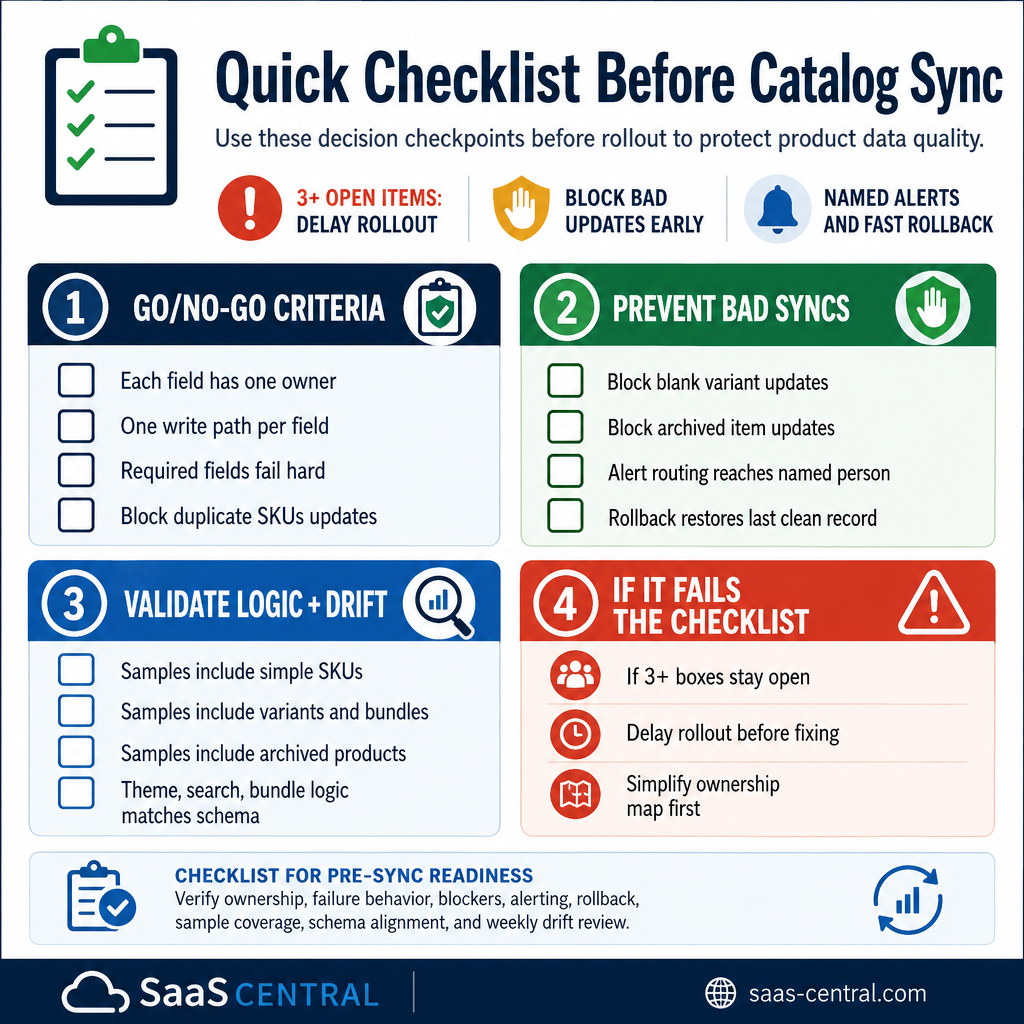
- Each field has one owner and one write path.
- Required fields fail hard, not silently.
- Duplicate SKUs, blank variants, and archived items block bad updates.
- Alert routing reaches a named person the same day.
- Rollback restores the last clean record.
- Sample records include simple SKUs, variants, bundles, and archived products.
- Theme, search, and bundle logic match the current metafield schema.
- A weekly review catches drift before it spreads.
If three or more boxes stay open, delay rollout and simplify the ownership map first.
Common Mistakes to Avoid
Fix these before they create cleanup debt.
- Syncing every field both ways. Most guides recommend this. That is wrong because ownership disappears and overwrite loops start.
- Using product title as identity. Titles change. Stable IDs and SKUs do not.
- Ignoring metafields. They look optional, then break filters, bundles, and storefront logic.
- Letting price and inventory share the same release path. Those fields move on different clocks and need separate controls.
- Waiting until the next bulk refresh to fix failures. Delay spreads bad values into search, feeds, and support.
- Mapping by display name instead of field key. Renames then break silently.
The hidden labor is not setup, it is rework. Every mistake above adds recurring cleanup instead of a one-time fix.
The Practical Answer
Use the lightest integration that preserves one source of truth for each field. That is the cleanest way to keep Shopify product data quality under control without building a maintenance burden that swallows the catalog team.
- Lean catalog teams: Keep Shopify as the edit surface for copy and use narrow, one-way updates for inventory or pricing. That keeps weekly cleanup low.
- Multi-system operations: Use middleware or a custom integration with field-level logs, conflict rules, and rollback. The setup takes more care, but it cuts exception work.
- No exception owner: Simplify the stack before adding another connector. A small, controlled workflow beats a broad sync nobody monitors.
The best setup reduces weekly rework, not just launch friction.
Frequently Asked Questions
What should own product data in Shopify integrations?
Each field needs one owner. Inventory, price, copy, and metafields should not accept writes from multiple systems unless a conflict rule resolves every case.
Should every field sync in both directions?
No. Two-way sync only works when both systems need the same field, change it at the same cadence, and support clear conflict resolution. Most catalogs do not meet all three conditions.
How often should sync errors be reviewed?
Review errors daily during rollout, then weekly after five consecutive business days pass without unresolved failures. Longer gaps let bad data reach storefront search, feeds, and support workflows.
Which fields deserve the tightest control?
Price, inventory, variant options, and metafields deserve the tightest control. Those fields affect availability, filtering, and storefront logic, so small errors spread quickly.
Is a simple integration enough for a small catalog?
Yes, if one person owns the catalog and the data changes infrequently. A narrow sync for operational fields plus manual control for content keeps maintenance low.
What is the fastest way to spot a bad integration?
Look for missing field-level logs, vague failure messages, and no named owner for exceptions. Those three gaps turn a sync into a cleanup machine.
Do metafields really matter that much?
Yes. Metafields drive filters, bundles, badges, and theme behavior. A bad metafield often breaks the merchandising layer before anyone notices a product page problem.
When does a custom API pipeline make sense?
A custom pipeline makes sense when several systems own different fields, audit history matters, and the catalog has enough volume to justify higher maintenance. It fits strict governance better than a basic connector.